


RepairsMe-AI Repair Assistant
3.66.00 Reviews
App Specs
- Version
- 3.3.7
- Updated On
- License
- Free
- Downloads
- 50,000+
- Developer
- REPAIRSME
- Categories
- House & Home
- Platform
- Android
Screenshots
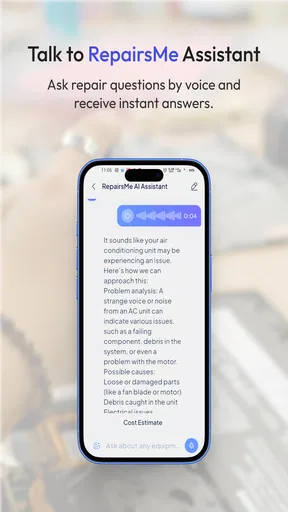
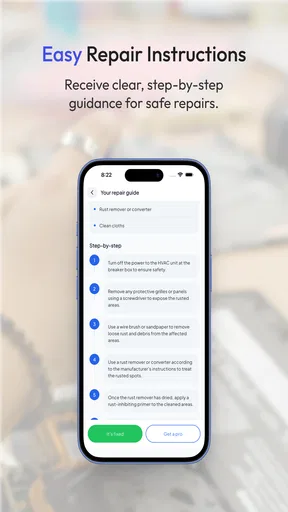
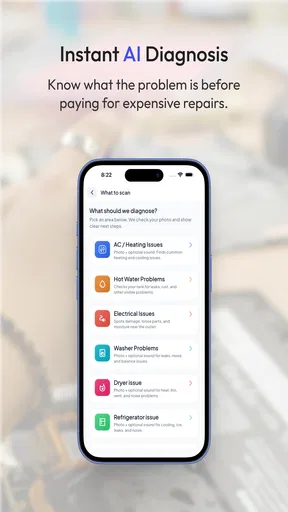
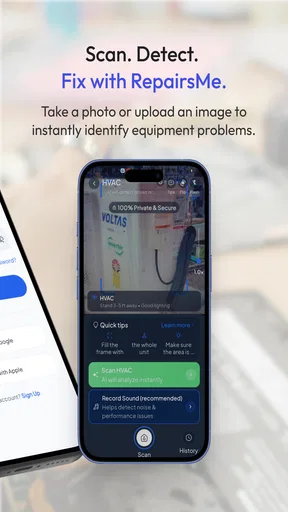
 Analysis by AppCompare
I tend to judge home-repair apps by a simple question: do they help me make a safer, better-informed decision, or do they merely give me another generic checklist? RepairsMe-AI Repair Assistant takes the more interesting route. It combines equipment scanning, photo uploads, an AI chat, and guided repair steps in one House & Home app from REPAIRSME. The idea is practical: instead of searching through unrelated videos and hoping I have identified the appliance correctly, I can start with the equipment in front of me and build the diagnosis around it.
That approach makes the app appealing for small household problems, especially when I am unsure whether an issue is something I can inspect myself or something that deserves a professional. It is free to install, rated for Everyone, and has passed the fifty-thousand-install mark, so it is not an obscure experiment with no public use at all. At the same time, its average rating of 3.6 from roughly fifty ratings suggests a mixed experience rather than a universally smooth one. I would treat it as a repair companion, not a guarantee that every fault can be solved from a phone.
How I would decide whether RepairsMe is the right repair tool
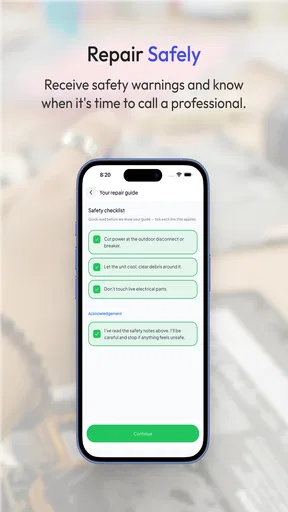
The first decision is the type of problem. This app makes the most sense when the equipment is visible, the symptoms can be described, and a photo may reveal useful clues. A loose-looking panel, a damaged connector, an error display, an unusual component, or a confusing control layout are all situations where visual context and a conversation can be more useful than a broad web search. If the problem involves gas, mains electricity, refrigerant, structural damage, or anything that could cause injury, I would use the app only for orientation and stop before attempting a risky repair.
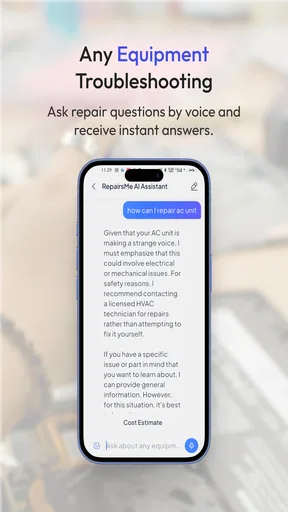
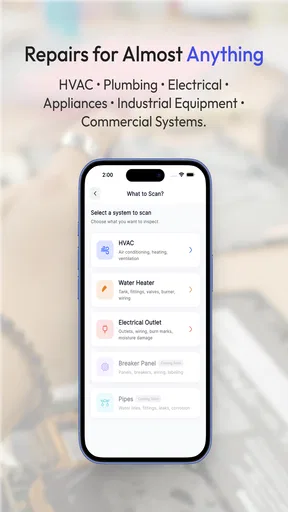
The second decision is how much certainty I need. A typical search engine gives me a large pile of possible answers, while a video platform often gives me a confident demonstration for a model that is not quite the same as mine. RepairsMe is designed to narrow that gap by letting me scan equipment, upload images, and ask questions in context. That does not make an AI answer automatically correct, but it can make the first stage of troubleshooting less scattered. I find that distinction important: the app is strongest at organizing investigation, not replacing technical certification.
There is also a learning curve in how the user presents information. A dark, distant photo or a vague message such as “it stopped working” gives the assistant very little to work with. A clear image of the model label, the affected area, and any visible warning code should produce a more useful conversation. I would photograph the whole unit first, then take close-ups from different angles, while keeping the device unplugged whenever opening a panel is part of the discussion. That small habit improves the quality of the exchange and reduces the temptation to act on a guess.
The app runs on Android starting with version 7.0, which makes it accessible to people using older compatible phones rather than only recent devices. Its current version is 3.3.7. For a household tool, that broad compatibility is convenient, although the actual usefulness of image-based assistance will still depend on the phone camera, lighting, and the clarity of the equipment label. The technical minimum tells me the app can be installed on an older device; it does not promise that every older phone will offer the same comfortable experience.
What the scan, photo, and chat workflow changes
I like the possibility of beginning with identification instead of diagnosis. When I do not know the name of a part, I can show it rather than spend time guessing search terms. That is a non-obvious advantage for older appliances, unfamiliar brands, and components whose everyday names differ from their technical names. Even if the eventual repair requires a manual or a technician, getting a more precise description of the object can make the next conversation much more efficient.
Worth Reading Before You Choose

EA SPORTS FC Mobile 26 Is a Bigger Football Game, but It Takes Time

Flipboard Shows What News Apps Must Do Beyond the Feed

Switching to Android Auto Means Rethinking Your Driving Routine

Google Calendar Makes a Crowded Week Easier to Manage

Ludo King Makes the Most of the Minutes Between Plans

Baby Panda World Brings Quick Play to Modern Phones, but Its Game Library Feels Busy
Photo uploads are useful in a different way. They create a visual record of the starting condition before I touch anything. I would use that to document cable positions, screw locations, connector orientation, and the arrangement of removable covers. This is not the same as a formal service record, but it is a sensible personal safeguard. If I decide to continue after the initial diagnosis, the original images can help me put things back as they were.
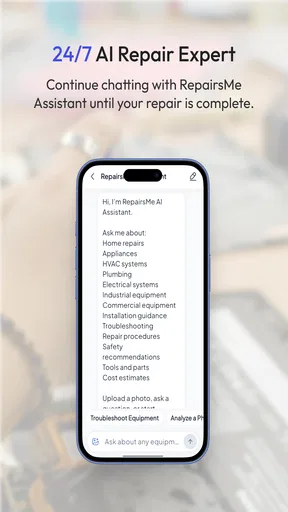
The AI chat is most valuable when I use it as an iterative checklist. Rather than asking for a broad repair immediately, I would ask what information is needed, report one observation at a time, and request the safest next check. For example, with a household appliance that will not start, I would separate power symptoms, display behavior, unusual smells, sounds, and recent changes. This approach reduces the risk of jumping straight to replacing an expensive part when the real cause is a simple connection or setting.
Step-by-step guidance can also help with the order of operations. A good sequence should move from low-risk observations toward more involved inspection, and I would expect to pause whenever a step requires exposing hazardous components. The app is therefore better suited to guided thinking than to blind following. If a suggested instruction seems to assume a model-specific layout that I cannot verify, I would stop and ask for clarification rather than forcing the procedure to match my equipment.
A realistic home scenario
Imagine a washing machine that finishes a cycle with water still inside. My first move would be to photograph the front, the model label, the control panel, and the drain area. In the chat, I would describe whether the machine makes a pump sound, whether an error appears, and whether the problem happens on every cycle. The assistant may help me organize checks around the filter, hose, or visible obstruction, but I would keep the machine disconnected before inspecting anything that could expose moving or electrical parts.
The useful outcome is not necessarily a successful repair in one sitting. It might be recognizing that the symptom is consistent with a blocked drainage path, learning which details a technician will need, or deciding that the appliance should remain untouched. That can save time even when the final solution is professional service. I would not use an AI-guided suggestion as permission to disassemble a sealed system, bypass a safety switch, or work near live power.
Another practical case is a small home-maintenance job where the difficulty is identification rather than danger. A user might find a cracked plastic fitting or an unfamiliar valve under a sink and not know whether it is replaceable. A clear photo and a description of where the leak begins can help frame the question. The app may be more useful here than a generic search because the conversation stays attached to the photographed object, though I would still verify dimensions and compatibility before buying a replacement.
Where it wins, where alternatives fit, and what switching costs
I look at the app’s strongest case as the moment when a repair question is still fuzzy: I can bring together a picture, equipment identification, and a description of the symptoms instead of starting with search terms I may not know. The trade-off is that changing tools means carrying my own observations forward, so I would keep clear notes rather than treating an AI suggestion as a confirmed diagnosis. That makes it easier to see whether this kind of guided triage is worth keeping in my routine.
Why it can beat ordinary searching
The strongest case for RepairsMe is convenience at the beginning of a repair. Traditional web searches are excellent when I already know the appliance model, the fault code, and the correct technical vocabulary. They become frustrating when I have only a symptom and a blurry idea of what I am looking at. The combination of scanning and visual questions lowers that vocabulary barrier. I can begin with evidence from the room instead of pretending I already understand the equipment.
It also has an advantage over a single tutorial video. Videos are often clear, but they follow one example and may hide differences between revisions or models. A conversational workflow gives me room to report that my connector looks different, that a panel is not where expected, or that the symptom changed after a check. That flexibility is particularly useful during diagnosis, when the important question is often “what should I observe next?” rather than “how do I copy this repair?”
A further strength is the potential to prepare for a service call. Before contacting a repair professional, I could use the app to collect the model information, photograph the relevant parts, note the symptoms, and record when the fault appears. Even if I do not trust an automated conclusion enough to repair the item myself, I may arrive at the appointment with a clearer description. For busy households, that organizational benefit may justify keeping the app available.
When another category is the better choice
I would choose a manufacturer manual or official support channel when the equipment is under warranty, the procedure is model-specific, or the next step involves a safety interlock. Official documentation is usually the better authority for exact specifications, approved replacement parts, reset procedures, and warranty-sensitive work. RepairsMe can help me understand the problem before I consult that material, but I would not let it override the manufacturer’s instructions.
I would choose a specialist forum or a repair community when the fault is unusual and requires long-term experience with a particular appliance family. Human contributors can compare recurring failures, point out misleading symptoms, and explain why a seemingly logical test is unreliable. The trade-off is slower searching and uneven quality. RepairsMe is more immediate, while a well-established community may offer deeper history for a niche model.
I would choose a local professional sooner when the risk is high, the equipment is expensive, or the consequences of a wrong diagnosis are serious. An AI assistant cannot physically test voltage, detect a hidden leak, feel a bearing, or accept responsibility for the result. It may help me decide what information to gather, but it is not a substitute for tools, training, or an in-person inspection. People who want a one-tap answer with no hands-on judgment should probably skip this app.
There is also a fit issue for users who dislike conversational troubleshooting. If I prefer a fixed manual, a searchable parts diagram, or a simple maintenance calendar, the app’s scan-and-chat style may feel indirect. Its value grows when I am willing to answer follow-up questions, upload better images, and challenge unclear instructions. That is a real trade-off: less time spent searching can mean more time spent describing the situation accurately.
Understanding the price before relying on it
The app itself is free, but in-app purchases range from fifty cents to nearly eighty dollars per item. That wide range means I would install it first, test the basic workflow on a low-risk question, and look carefully at the purchase prompt before committing to anything. I would not assume that every useful repair conversation is included at no cost, and I would avoid starting a paid interaction until I understood what it unlocks and whether it suits the problem in front of me.
This matters because repair decisions already involve uncertain spending. A paid assistant session may be reasonable if it helps me avoid an unnecessary replacement or prepares a useful diagnosis for a technician. It is harder to justify when the appliance is old, the likely repair is inexpensive, or official instructions are readily available. I would compare the possible app cost with the value of clearer information, not with the full price of a new appliance.
The cost of switching away is low if I use the app as an initial triage tool. I can keep my photos, notes, model details, and observations and carry them to a manual, forum, store, or professional. To make that transition easy, I would save the model label and write down the exact symptom before ending the session. I would also separate what I directly observed from what the assistant suggested. That simple distinction prevents a tentative AI explanation from becoming an unverified “fact” in a later repair conversation.
Small techniques that make the experience more useful
My first tip is to photograph labels before photographing damage. The model and serial information often provide more diagnostic value than a dramatic close-up of a broken-looking part. I would then add one wide image showing where that part sits in the equipment. This gives the conversation both identity and context, which is more useful than sending several nearly identical close-ups.
My second tip is to ask for a risk-ranked sequence rather than a list of possible causes. I would want the assistant to distinguish visual checks, cleaning or obstruction checks, unplugged inspection, and tasks that require a professional. This encourages a safer workflow and makes it easier to stop at the right point. If the answer jumps directly to replacing a board or opening a hazardous assembly, I would treat that as a reason to verify elsewhere, not as a shortcut.
My third tip is to use the chat as a repair log. After each check, I would record the result in plain language and attach a new image only when the condition has changed. This can reveal patterns that are easy to miss in a rushed session, such as a fault appearing only after heating, draining, or extended use. It also gives a technician a cleaner timeline than a memory-based explanation.
Finally, I would ask the assistant to explain what would disprove its leading theory. That question is more valuable than repeatedly asking whether the diagnosis is correct. If the proposed cause is a blocked filter, for instance, I would want to know what observation would point elsewhere. This habit reduces confirmation bias and is one of the best ways to use an AI tool responsibly.
My recommendation for different kinds of users
I recommend trying RepairsMe if you regularly face small household equipment questions, struggle to identify parts, or want help organizing photos and symptoms before deciding what to do. It is especially promising for cautious DIY users who understand that guidance is not the same as authorization. The free entry point makes experimentation reasonable, while the Everyone age rating keeps it approachable for ordinary household use, with sensible adult supervision around tools and hazardous equipment.
I would be more reserved for anyone expecting guaranteed model-perfect instructions, a complete parts catalog, or a replacement for a trained repairer. The mixed 3.6 average tells me to keep expectations measured, and the presence of paid items makes it important to test the experience before treating it as a regular expense. I would also skip it as my primary resource for dangerous systems, warranty-sensitive work, or repairs where one wrong step could create a larger loss.
Overall, RepairsMe-AI Repair Assistant is most convincing as a first-response tool: show it the equipment, explain the symptom, gather structured observations, and use the result to choose between a safe DIY check and professional help. It does not remove the need for judgment, official documentation, or physical expertise. What it can do is make the confusing first ten minutes of a repair less chaotic, and for many everyday problems, that is a genuinely useful place to start.
My final advice is to begin with a low-risk issue, good lighting, a clear model-label photo, and no rush to open anything. Keep the suggested steps separate from confirmed observations, verify important instructions against the manufacturer, and watch the purchase details before paying. Used that way, RepairsMe-AI Repair Assistant earns a place on my phone as a practical troubleshooting companion, while the manual and the qualified professional remain the final authorities when the situation demands them.
Pros
- AI guidance can help identify likely causes before booking a repair.
- Useful for comparing repair options and deciding whether a technician is needed.
- Can save time by organizing appliance or device problem details.
- Accessible at any time without waiting for customer support.
- Helpful for users with limited technical repair experience.
Cons
- AI suggestions may be inaccurate for unusual or complex faults.
- Some repairs still require professional tools
- parts
- or technical skills.
- Incorrect DIY steps could cause further damage or safety risks.
- The quality of advice depends on how clearly the problem is described.
- Availability of repair services or parts may vary by location.
FAQs for RepairsMe-AI Repair Assistant
What is RepairsMe-AI Repair Assistant and what can it do?
RepairsMe-AI Repair Assistant is designed to help users identify and troubleshoot common repair problems with the assistance of artificial intelligence. Depending on the supported device or repair category, you can describe an issue, review suggested causes, and follow step-by-step guidance. It is best viewed as a practical starting point for diagnosis rather than a replacement for a qualified technician, especially when the problem involves electricity, gas, water, vehicles, or other safety-sensitive equipment.
How accurate are the repair recommendations provided by the app?
The app’s recommendations can be useful for narrowing down possible causes and suggesting basic checks, but accuracy depends heavily on the information you provide. Clear descriptions, photos, model numbers, symptoms, and previous repair attempts can improve the results. AI-generated guidance may occasionally be incomplete, unsuitable for a particular model, or simply incorrect, so users should verify instructions with official manuals and stop immediately if a repair appears unsafe or beyond their experience.
Is RepairsMe-AI Repair Assistant suitable for beginners?
RepairsMe-AI Repair Assistant can be helpful for beginners because it presents troubleshooting information in a conversational and accessible format. It may help you understand a problem before contacting a professional and guide you through simple checks or maintenance tasks. However, beginners should not treat every suggested procedure as risk-free. Always disconnect power when appropriate, use protective equipment, follow manufacturer instructions, and avoid opening devices or handling hazardous components without proper knowledge.
Does the app work with every device, appliance, or repair problem?
The app may support many common repair scenarios, but no AI assistant can guarantee coverage for every brand, model, component, or fault. Results can vary depending on the type of item, the amount of technical information available, and whether the issue is common enough to diagnose from symptoms. Before downloading, check the app’s current store description, supported categories, device compatibility, and any limitations listed by the developer.
Is it safe to follow the app’s repair instructions?
RepairsMe-AI Repair Assistant should be used as informational support, not as a definitive safety authority. Some repairs involve electric shock, fire, chemical exposure, pressurized systems, moving parts, or damage to expensive equipment. Read each instruction carefully, confirm it applies to your exact model, and consult a certified professional whenever the task is complex or hazardous. The app’s guidance should never override an official service manual, warranty requirements, or local safety regulations.


